# 网页多标签页之间的通讯
# 题目
网络多标签之间如何通讯?
例如打开两个 chrome 标签,一个访问列表页,一个访问详情页。在详情页修改了标题,列表页也要同步过来。
# webSocket
通过 webSocket 多页面通讯,无跨域限制。
# localStorage
同域的两个页面,可以通过 localStorage 通讯。A 页面可以监听到 B 页面的数据变化。
// list 页面
window.addEventListener('storage', event => {
    console.log('key', event.key)
    console.log('newValue', event.newValue)
})

// detail 页面
localStorage.setItem('changeInfo', 'xxx')
# SharedWorker
Javascript 是单线程的,而且和页面渲染线程互斥。所以,一些计算量大的操作会影响页面渲染。
WebWorker (opens new window) 可以 new Worker('xxx.js') 用来进行 JS 计算,并通过 postMessage 和 onmessage 和网页通讯。
但这个 worker 是当前页面专有的,不得多个页面、iframe 共享。
PS:WebWorker 专用于 JS 计算,不支持 DOM 操作。
SharedWorker (opens new window) 可以被同域的多个页面共享使用,也可以用于通讯。
源码参考 msg-sharedWork-list.html 和 msg-sharedWork-detail.html 。注意,worker 中的日志需要 chrome://inspect 中打开控制台查看。
PS:注意浏览器兼容性,不支持 IE11
# 答案
- webSocket 需要服务端参与,但不限制跨域
- localStorage 简单易用
- SharedWorker 本地调试不太方便,考虑浏览器兼容性
# 连环问:iframe 通讯
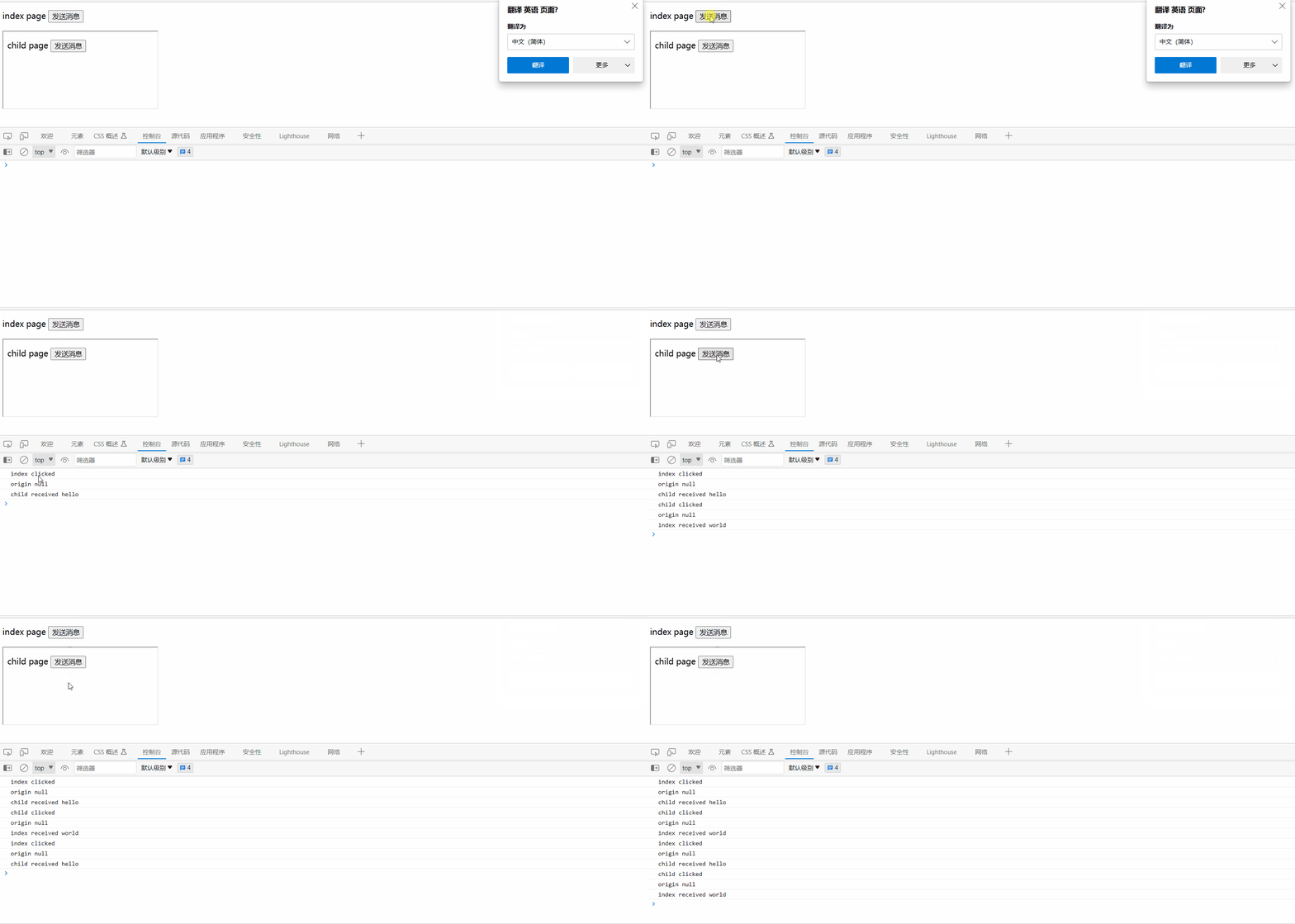
除了上述几个方法,iframe 通讯最常用 window.postMessage (opens new window) ,支持跨域。
通过 window.postMessage 发送消息。注意第二个参数,可以限制域名,如发送敏感信息,要限制域名。
// 父页面向 iframe 发送消息
window.iframe1.contentWindow.postMessage('hello', '*')

// iframe 向父页面发送消息
window.parent.postMessage('world', '*')
可监听 message 来接收消息。可使用 event.origin 来判断信息来源是否合法,可选择不接受。
window.addEventListener('message', event => {
    console.log('origin', event.origin) // 通过 origin 判断是否来源合法
    console.log('child received', event.data)
})
index.html
<!DOCTYPE html>
<html lang="en">
<head>
    <meta charset="UTF-8">
    <meta http-equiv="X-UA-Compatible" content="IE=edge">
    <meta name="viewport" content="width=device-width, initial-scale=1.0">
    <title>index</title>
</head>
<body>
    <p>
        index page
        <button id="btn1">发送消息</button>
    </p>

    <iframe id="iframe1" src="./child.html"></iframe>

    <script>
        const btn1 = document.getElementById('btn1')
        btn1.addEventListener('click', () => {
            console.info('index clicked')
            window.iframe1.contentWindow.postMessage('hello', '*')
        })

        window.addEventListener('message', event => {
            console.info('origin', event.origin) // 来源的域名
            console.info('index received', event.data)
        })
    </script>
</body>
</html>
child.html
<!DOCTYPE html>
<html lang="en">
<head>
    <meta charset="UTF-8">
    <meta http-equiv="X-UA-Compatible" content="IE=edge">
    <meta name="viewport" content="width=device-width, initial-scale=1.0">
    <title>child</title>
</head>
<body>
    <p>
        child page
        <button id="btn1">发送消息</button>
    </p>

    <script>
        const btn1 = document.getElementById('btn1')
        btn1.addEventListener('click', () => {
            console.info('child clicked')
            window.parent.postMessage('world', '*')
        })

        window.addEventListener('message', event => {
            console.info('origin', event.origin) // 判断 origin 的合法性
            console.info('child received', event.data)
        })
    </script>
</body>
</html>